
If you’re a content creator, you know that it takes a lot more time and effort than it seems to create a video. From thinking up the idea to shooting multiple takes to editing everything together, a ten-minute clip can take more than an hour to put together.
So, anything that can make the process easier and faster is a welcome addition to any creator’s toolkit. Adobe has exactly what you need with Firefly, an AI assistant created specifically to make every step of the creation process as frictionless as possible. Best of all, you can try it out for free.
More than an assistant
Adobe Firefly does far more than edit your videos to cut out dead space — it can help at every step of the process.
For example, Firefly can create a mood board to help you find inspiration. Tell Firefly what kind of mood board you’re looking for, the dimensions you want the images in, and it’ll generate images and assemble them for you. This may not seem like a huge feature, but artists and content creators know how much these features can help with generating new ideas.
You can also use Firefly as a sounding board to further refine your ideas. Instead of floundering with a vague idea and plan, Firefly can help you with various suggestions on how to take the idea further. Most importantly, you don’t get one clear-cut solution for what you want to make, so the true creative process is yours and yours alone.
Remove the tedium
Of course, Firefly does a lot more than help with idea generation. It also helps with the time-consuming tedium of creating social content. Firefly will edit images, generate music for an otherwise silent video, remove an object from an image, and plenty more. There is also a thumbnail generator, which can feel like the hardest part of the process for some creators. With Firefly, the frustration and time wasted on making an engaging image disappear.
The small things in content creation can create bigger problems down the line that Firefly can solve. Did you take an image in vertical orientation and later realize you needed it in landscape? Firefly can extend the image. Did you accidentally catch a stranger in your selfie? Firefly can remove them from the photo and make the background look natural. Is the resolution of a photo or video too poor? Firefly can upscale them for you.
With this AI assistant, you don’t need to discard and reshoot content; it’ll fix any small errors without extra fuss or tweaking.
Create and build your brand
Any creator on the internet will tell you how important branding is. Without a unique brand and pull, there’s no reason for anyone to stick around and follow you.
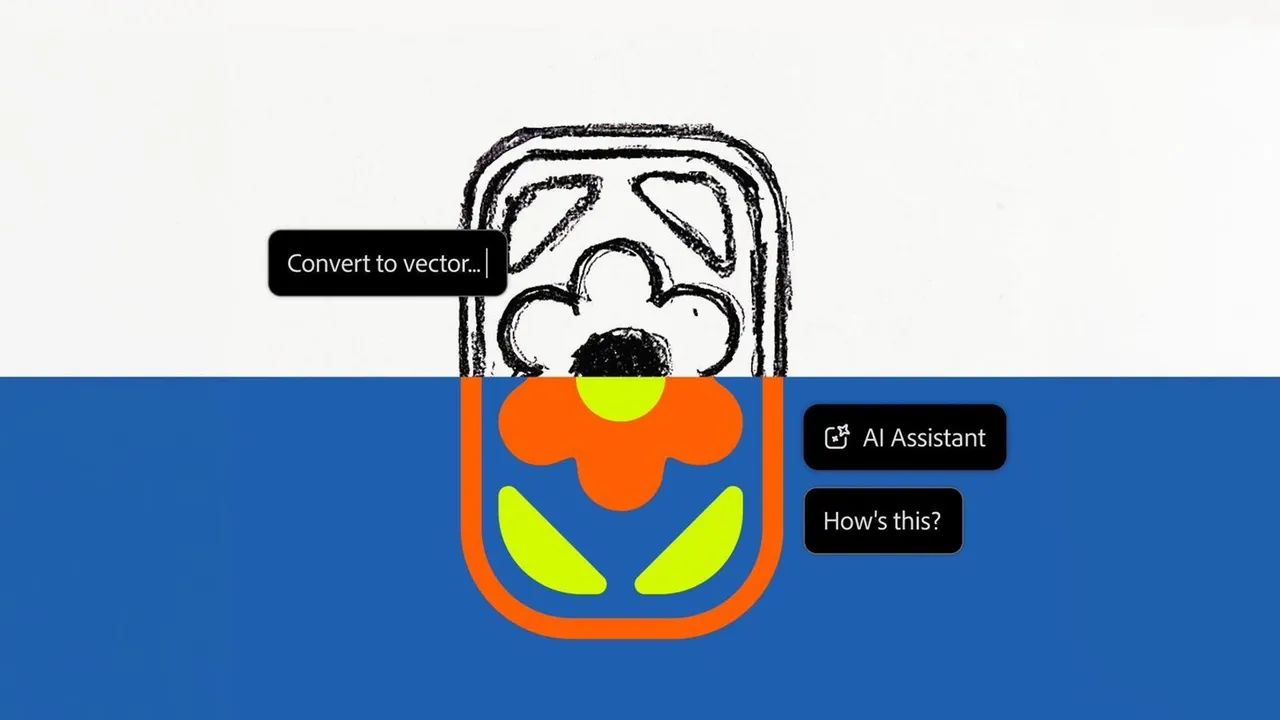
Firefly makes the branding process as easy as clicking a few buttons. Take the Image to Vector feature, for instance. Since vector images are infinitely scalable, they’re ideal for logos, since making the size bigger doesn’t make the picture blurry and pixelated. But you may not have a logo in a vector image format. Thankfully, you’re not out of luck, as Firefly can take your raster picture and convert it to the vector format for you.
There are several other functions that can also help create your brand more easily than ever. A headshot generator offers a great-looking avatar for social media and a picture for email signatures. A variety of image generation options, from a pixel art makeover to cartoonizing an image, can help create a unique look to make you stand out. If you don’t need a whole mock-up and just need the logo placed on a product image, Firefly can do that, too, with just a few clicks.
Firefly can even generate videos for you. Give the assistant an image, and it’ll replace the background and create an 8-second video showcasing the product. 8 seconds isn’t too long to annoy a browser, but not too short to cut off before properly showing it off.
Make great product content in minutes
Do you create social media posts and content for a company? There is plenty Firefly can help you with. Firefly can remove the background from an image and generate a new one for you — perfect if you want to take a picture with natural lighting but don’t want a busy background that pulls attention away from the product itself.
Adobe’s AI assistant can also make a product brand mock-up. With the mock-up, you simply provide an image, your logo, and a prompt to Firefly, and you’ll have a great set of mock-up images for product listings and aesthetically pleasing social media posts. You can continue to experiment with different colors, backgrounds, and more. You’re not stuck with just one image per mock-up; you can make a full line of images with a bit of experimentation.
Remove the pain points in content creation with Adobe Firefly
Adobe Firefly’s AI Assistant is a tool tailored specifically for content creators, helping with inspiration, editing, and making a standalone brand. But you don’t even have to take our word for it. Right now, you can try Firefly for free, and your generations will refresh daily rather than weekly or monthly, as with other services. So, giving it a look should be worth it.