

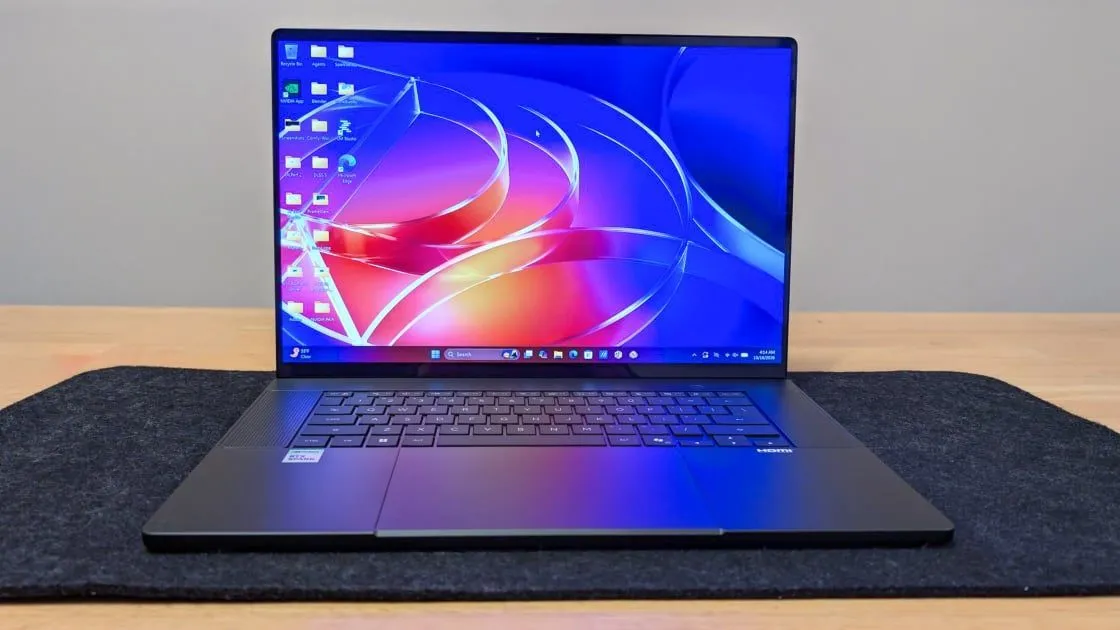
The ProArt P16 (H7607) is distinct from other P16 workstations in that it is built around the Nvidia RTX Spark N1X processor. RTX Spark laptops are designed for local AI inference, going above and beyond what a standard Copilot+ PC can do with a (comparatively puny) neural processing unit. While all of the RTX Spark laptops are powerhouses compared with the laptop market as a whole, you've got a wide range of options to choose from, with differences in CPU and GPU core counts, unified memory, bulk storage, and features like the display.
(Credit: Brian Westover)
The entry-level model costs $2,799.99 and is currently available only at Best Buy. It's outfitted with the RTX Spark N1X chip with an 18-core Grace CPU, a Blackwell GPU with 5,120 CUDA cores, 24GB of unified LPDDR5X memory, and 512GB of SSD storage. (What are Blackwell and CUDA? We'll discuss those below.) That puts it in line with more mainstream laptops in terms of capacity, despite the processing hardware offering better-than-average support for small AI models and agentic tools.
The mid-tier model offered at Best Buy sells for $3,399.99, and steps up to the N1X with 20 CPU cores and 6,144 CUDA cores. This is the more capable version of the RTX Spark N1X hardware, offering faster performance and more robust AI support. This model comes with 32GB of unified memory, 1TB of SSD storage, and a 16-inch 4K OLED touch screen.
Similar Products
Our Current Picks for The Best Mobile Workstations for 2026
Dell Pro Max 14 Premium
4.0
Excellent
$2,946.91 at Dell
$2,946 at Dell Read Our Review
HP ZBook Studio 16 G11
3.5
Good
$2,049.00 at B&H Photo Video
$2,449.00 Save $400.00
$2,049 at B&H Photo Video Read Our Review
Dell Pro Max 18 Plus
4.0
Excellent
$4,190.00 at Dell
$4,190 at Dell Read Our Review
HP ZBook Fury 16 G11
4.0
Excellent
$2,408.47 at Amazon
$2,408 at Amazon Read Our Review
Lenovo ThinkPad P1 Gen 8
4.0
Excellent
$4,819.00 at Amazon
$4,819 at Amazon Read Our Review
Lenovo ThinkPad P16 Gen 2
4.0
Excellent
$2,459.99 at Amazon
$2,459 at Amazon Read Our Review
Apple MacBook Pro 16-Inch (2026, M5 Max)
4.5
Outstanding
$3,499.00 at Amazon
$4,399.00 Save $900.00
$3,499 at Amazon Read Our Review
Apple MacBook Pro 14-Inch (2025, M5)
4.5
Outstanding
$1,886.99 at Amazon
$1,886 at Amazon Read Our Review
HP ZBook Firefly 14 G11
3.5
Good
$1,799.99 at Amazon
$1,799 at Amazon Read Our Review
The next level up is our review configuration, sold directly at Asus.com. It has the RTX Spark N1X with a 20-core Grace CPU and the larger Blackwell GPU (6,144 CUDA cores), and is outfitted with 64GB of unified memory and 1TB of SSD storage. However, the 16-inch display on this model is a step-down 3K OLED panel with touch support, notable for its lower resolution and lower peak SDR brightness rating (500 nits).
Finally, the top-tier flagship configuration, also sold directly through Asus, pairs the RTX Spark N1X with a 20-core Grace CPU and 6,144-core Blackwell GPU with a full 128GB of LPDDR5X unified memory and 2TB of SSD storage. It also has the top-of-the-line 16-inch 4K OLED touch screen with 1,600-nit HDR peak brightness. This top model costs $6,999.99.
Before we dive into the laptop's features and performance, it's worth spending a moment on exactly what makes up the RTX Spark's hardware.
The N1X chip combines an Arm-based Grace CPU with Blackwell graphics. It's a refined version of the Grace Blackwell hardware used in the Nvidia DGX Spark. The chip is co-developed with MediaTek, combining Nvidia's GPU and AI compute stack with MediaTek's chip-engineering know-how. The multi-die SoC is fabricated on TSMC's 3-nanometer node. It connects the CPU and GPU dies with Nvidia's NVLink-C2C interconnect, which Nvidia claims virtually eliminates operational latency.
(Credit: Nvidia)
That larger SoC design bypasses the usual PCIe bus bottlenecks and VRAM caps that you'll get on something like a gaming laptop or a traditional workstation laptop. It allows the CPU and GPU cores to scale up to 1 petaflop of 4-bit floating-point arithmetic. Combine that with a single shared physical address space that both the CPU and GPU can access simultaneously without data duplication, and you eliminate the usual limitations of VRAM, allowing giant blocks of memory to be assigned dynamically to the GPU for loading larger AI models and supporting bigger context windows.
The platform is designed to allow as much as possible to run natively on Arm, including native Nvidia CUDA toolchains and TensorRT execution environments, with Microsoft's Prism emulation engine handling legacy x86 apps and workflows.
It really is an impressive amount of processing power to fit into a laptop design. If you want to dig further into the new architecture or how we test the AI capabilities it brings, check out our initial tests of this very laptop or our article on how we test AI PCs.
Several standout design elements are worth calling out, starting with the build quality. The ProArt line has established a solid reputation as a desktop replacement laptop, but handling this RTX Spark edition immediately reveals a system that is slightly but noticeably slimmer and lighter than its predecessor, the AMD-based Asus ProArt P16 (2026). That laptop is 0.68 by 14 by 9.7 inches (HWD) and 4.1 pounds, compared with 0.63 by 13.9 by 9.6 inches and 3.9 pounds for the model reviewed here.
(Credit: Brian Westover)
The all-metal aircraft-grade aluminum design is still premium, and while the weight isn't light enough to make it ultraportable, we've tested plenty of laptops in this performance class that weigh considerably more. It's also robust enough to get MIL-STD-810H certification against hazards like altitude, vibration, mechanical drops, dust, and temperature shock. It's not a fully rugged laptop, but it will stand up to the abuses of daily use just fine.
The chassis comes in two finishes: Nano Black or Neo White. The first, shown in the photos here, is an anodized finish treated with an anti-fingerprint, smudge-resistant coating, but it's more of a dark metallic gray than actually black. And it didn't completely keep the palm rest smudge-free during daily testing, though a wipe with a soft microfiber cloth helps a lot. The other option, Neo White, uses a specialized sandblasting process to turn bare metal into a silvery-white matte finish. It definitely looks cool, but I only briefly handled the model with that color scheme, so I can't speak to how well it holds up to smudges over the long term. Asus also bundles a fitted carrying sleeve in the box.
The keyboard and touchpad setup gets some tweaks for the RTX Spark model. In an innovative twist, the space around the keys doubles as an intake for the system's thermal management. Meanwhile, this is the largest touchpad Asus has ever put on a laptop, the company claims.
(Credit: Brian Westover)
The keyboard itself is comfortable, with a backlit chiclet design, 1.7mm of key travel, and subtly dished keycaps that make typing crisp and accurate. Air flows downward through the keys and the deck, with dual fans and a vapor chamber dissipating heat before expelling it through the rear hinge.
In front of the keyboard deck sits what Asus calls a HapticPad, a touch surface that's slightly larger than the glass trackpad on the 16-inch Apple MacBook Pro. It uses a smooth etched glass and haptic actuators to simulate crisp, uniform clicks across the entire surface. There's nothing mechanical about it. Notably, Asus dropped the physical, recessed DialPad wheel seen on the standard ProArt P16.
For those who prefer dedicated hardware controls, Asus includes the ProArt Mouse MD301 in the box (a $99 value). It's an ergonomic wireless mouse supporting Bluetooth and 2.4GHz pairing for up to three devices, featuring an 8,000dpi optical sensor, swappable switches, a dedicated thumb scroll wheel, and USB-C fast charging that nets several hours of juice in just 1 minute of charging time.
(Credit: Brian Westover)
The Asus ProArt P16 offers a versatile array of ports, catering to content creators and workstation users who'd rather ditch dongles and adapters.
(Credit: Brian Westover)
On the left-hand side of the system, you will find a pair of USB4 Type-C ports capable of 40Gbps throughput, DisplayPort 2.1 video output, and USB Power Delivery. Also here: a full-size HDMI 2.1 port for connecting external displays (the laptop supports 4K at 120Hz or 8K at 60Hz), along with a 3.5mm combo audio jack for headsets, headphones, or speakers.
(Credit: Brian Westover)
On the right-hand side of the laptop is a third USB-C port (also supporting 40Gbps throughput, DisplayPort 2.1, and Power Delivery), along with a 10Gbps USB Type-A port and a full-size SD card slot. I appreciate that the card slot is not limited to standard UHS-II speeds; it's an SD Express 7.0 reader that can offload data from camera media at transfer rates of up to 985MBps. That'll make a big difference for anyone working with photos or videos. The ProArt also has a tri-band, 2x2 MIMO Wi-Fi 7 radio and Bluetooth 5.4.
Charging is handled through the USB-C ports. The 140-watt adapter can be plugged into any of the USB-C slots on either side of the machine, but it does mean that when you're plugged in for power, you're down one of the three USB-C connections.
To test the overall performance of the Asus ProArt P16, we assembled a broad selection of competing laptops, including those with RTX Spark chips. These include the Microsoft Surface Laptop Ultra, as well as the soon-to-be-reviewed HP OmniBook Ultra and Lenovo Yoga 9n.
We also included the Apple MacBook Pro 16-inch with M5 Max, which is currently the leader among laptops for running robust local AI, and the HP ZBook Ultra G1a 14. The latter uses an AMD-based SoC design that is also built for local AI on Windows, but represents an earlier iteration of this concept and really shows how far the hardware has come in a very brief time.
Finally, we included the Asus Zenbook A16, a laptop built on the Qualcomm Snapdragon X2 Elite Extreme SoC. With 48GB of RAM, it offers better-than-average AI capability, but it does not meet RTX Spark standards.
The complexity of different platforms and operating systems means that we couldn't run every test on every system. But with this lineup of comparisons, we have a good set of numbers across most of our tests and a solid baseline for comparing AI performance.
Our first group of tests represents workloads such as content creation, office productivity, and raw CPU speeds. Our go-to overall productivity and storage testing suite, UL's PCMark 10, is not yet Arm-compatible, so we left it out here, and focused on core-stressing tests and media tasks.
The three primary tests presented below are CPU-centric. Maxon's Cinebench 2024 uses that company's Cinema 4D engine to render a complex scene; Primate Labs' Geekbench 6.3 Pro simulates popular apps ranging from PDF rendering and speech recognition to machine learning; and we see how long it takes the transcoding freeware HandBrake 1.8 to convert a 12-minute clip from 4K to 1080p resolution.
We have encountered issues with Puget Systems' PugetBench for Creators Adobe Photoshop 25 test (another of our staple benchmarks) on systems with Arm processors, so we’ve skipped it here too.
Throughout our productivity testing, we routinely saw RTX Spark laptops deliver rock-solid performance in Cinebench, HandBrake, and Geekbench Pro.
In our Cinebench rendering test, the Asus ProArt P16 scored just shy of 1,600 points, right in line with other RTX Spark systems we've tested, and getting a clear advantage over the Qualcomm-powered Asus Zenbook A16. The leader for this test, and for most of our tests, is the MacBook Pro 16-inch with M5 Max.
The exception to this pattern is the HandBrake video transcoding tests, which the Asus ProArt completed in just over 2 minutes—5 seconds ahead of the MacBook Pro, and 20 to 30 seconds ahead of other RTX Spark systems. The real outlier was the Asus Zenbook A16, which was dramatically slower than the competing laptops.
And in Geekbench Pro, the Asus ProArt P16 and the Microsoft Surface Laptop Ultra both turned in nearly identical results. Again, the MacBook Pro with M5 Max leads the pack, scoring nearly 10,000 points higher.
So the primary takeaway is that, in core productivity and processing performance tests, RTX Spark is very capable, but still has some catching up to do compared with Apple's highly refined M-series processors.
We challenge all systems’ graphics with a quintet of animations or gaming simulations from UL's 3DMark test suite. The first pair, Wild Life (1440p) and Wild Life Extreme (4K), uses the Vulkan graphics API to measure GPU speeds. The second pair, Steel Nomad's regular and Light subtests, focuses on APIs commonly used for game development to assess gaming geometry and particle effects. Last, we turn to 3DMark's Solar Bay to measure ray-tracing performance.
Across our 3DMark tests, the ProArt P16 stayed right toward the front of the pack, often trading back and forth between other RTX Spark systems for second place. The leader, in virtually every test, was the MacBook Pro 16-inch again.
The one exception to this is 3DMark Wild Life, which we don't run on Macs. It's still valid for seeing how RTX Spark compares with other Windows machines, though. The Asus Zenbook A16, which is based on Qualcomm's top-tier processor, scored 38,833 points, the lowest of the bunch. The top performer was the HP OmniBook Ultra, a 32GB RTX Spark model that we'll be reviewing shortly. The Asus ProArt and several competitors all fell somewhere in between, right in the 50,000-to-60,000-point range.
Even though the RTX Spark ostensibly has graphics power comparable to an Nvidia GeForce RTX 50-series GPU, several of the games we use to test gaming laptops aren't Arm native, so we're not including game testing results here.
We test laptops' battery life by playing a locally stored 720p video file with display brightness at 50% and audio volume at 100%. We make sure the battery is fully charged before the test, with Wi-Fi and keyboard backlighting turned off.
We also use a Datacolor SpyderX Elite monitor calibration sensor and software to measure a laptop screen's color saturation—what percentage of the sRGB, Adobe RGB, and DCI-P3 color gamuts or palettes the display can show—and its 50% and peak brightness in nits (candelas per square meter).
When it comes to battery life, RTX Spark systems across the board deliver fantastic all-day performance, routinely lasting over 15 hours. The Asus ProArt P16 lasted 16 hours and 26 minutes in our video rundown test, which puts it in the middle of the pack for RTX Spark systems. The winner is the MacBook Pro 16-inch with M5 Max, which lasted more than 27 hours. On the flip side, the HP ZBook Ultra G1a 14, which was one of the very first Windows machines to use an SoC design with unified memory for AI, had dramatically shorter battery endurance at just under 7 hours, which is a real testament to how far efficiency has improved over the last year and a half.
RTX Spark laptops are supposed to offer even performance between battery and plugged-in use. We're still looking at the best ways to test and confirm that specific claim, but what we've seen in the RTX Spark systems we've tested so far seems to support it.
Though the ProArt P16 we tested does not have the top-of-the-line display, it still offers fantastic color quality, delivering 100% of both sRGB and DCI-P3 color spaces, and 96% of Adobe RGB. That puts it in the very top tier of display quality we've seen.
Brightness is also fairly impressive, delivering more than 400 nits when turned up to 100% brightness. Our test measures SDR content, so the panel is probably capable of delivering brighter hot spots with HDR content for short periods of time, but for sustained brightness, this is quite good, pulling ahead of the Apple MacBook Pro and the HP ZBook Ultra G1a 14. The Microsoft Surface Laptop Ultra, however, leads the pack here thanks to a mini-LED backlight that offers top-notch brightness and backlighting control.
To evaluate AI performance, we divide PCs into three classes, with Class 1 being the least powerful. Check out our deep-dive rundown for more on how we test AI PCs. The 128GB ProArt P16 model is Class 3, but the configuration we tested is Class 2, so we didn't run the most demanding Class 3 tests on it.
For Class 2 PCs, we run both Class 2 and Class 1 tests. For Class 1 testing, we use MLPerf Client with the lightweight Llama 3.1 8B Instruct model. MLPerf uses this model to run a series of text prompts with use cases as varied as chatbots, coding, and document summarization. The test runs for several iterations, using preset text prompts and measuring performance by tracking time to first token (TTFT), which indicates how quickly an AI begins responding, as well as tokens per second (TPS), which indicates the rate of text generation throughout the response.
Class 2 testing scales up to include more demanding reasoning tasks. We use these tests to evaluate machines with more powerful discrete GPUs and dedicated VRAM, because reasoning requires a higher-parameter model and more available memory. Our Class 2 testing applies the Phi 4 Reasoning 14B model to advanced reasoning tasks and larger text prompts of 4,000 to 8,000 tokens to simulate real-world workloads. It uses a standard set of prompts for analyzing multi-page documents, scientific datasets, and code repositories, and we measure and record TTFT and TPS to assess how quickly and efficiently a system handles tasks at this higher level of complexity.
Starting with Class 1 testing, we saw speedy performance from the ProArt P16, outputting the first token in less than half a second. However, this was a hair slower than we saw in the same test with the Surface Laptop Ultra, which has the same RTX Spark hardware.
As before, the MacBook Pro 16-inch leveraged its M5 Max processor to pull ahead of both RTX Spark laptops we've tested. By comparison, the HP ZBook Ultra G1a 14, which also has a similar SoC design based on the AMD Ryzen platform, was considerably slower, taking more than 1.5 seconds to output the first token.
The Asus ProArt P16 achieved 53tps, which was just a hair behind the 56tps of the Surface Laptop Ultra. However, the real differences are evident among non-RTX Spark laptops. The older HP ZBook Ultra G1a 14 plodded along at 36tps, while the MacBook Pro 16-inch achieved a stellar 105tps.
When we switch to the more demanding reasoning model in Class 2 testing, we see a similar pattern. TTFS is admirably fast on both the ProArt and the Surface Laptop Ultra, but the Microsoft has the slight edge. The MacBook Pro, on the other hand, leads by a sizable margin, coming in at less than half a second to get that first token out.
When we look at sustained text generation rates, the ProArt produced 27tps, while the Microsoft Surface Laptop produced 31tps. Again, the MacBook Pro achieved double the overall tokens per second, thanks to the more powerful M5 Max.
(Credit: Brian Westover)
Asus ProArt P16 (H7607, RTX Spark)
4.0
Excellent
What Our Ratings Mean
5.0 - Exemplary: Near perfection, ground-breaking
4.5 - Outstanding: Best in class, acts as a benchmark for measuring competitors
4.0 - Excellent: A performance, feature, or value leader in its class, with few shortfalls
3.5 - Good: Does what the product should do, and does so better than many competitors
3.0 - Average: Does what the product should do, and sits in the middle of the pack
2.5 - Fair: We have some reservations, buy with caution
2.0 - Subpar: We do not recommend, buy with extreme caution
1.5 - Poor: Do not buy this product
1.0 - Dismal: Don't even think about buying this product
Read Our Editorial Mission Statement and Testing Methodologies.
The Asus ProArt P16 (H7607) shows that a top-tier creative laptop can be upgraded to meet the demands of the burgeoning world of local AI. RTX Spark brings a lot of new capabilities to Windows, and the hardware is undeniably impressive not only for AI and agents, but also for content creation and gaming. By pairing the Arm-based N1X superchip and its unified memory pool with a slimmer, 3.9-pound aluminum chassis, a vibrant 120Hz OLED screen, and more than 16 hours of battery life, Asus has transformed one of its best creator laptops into a genuinely portable local AI workhorse. Add in creator-friendly perks like an ultra-fast SD Express 7.0 slot and a bundled mouse, and you get a well-rounded machine.
Overall, RTX Spark laptops are still niche and expensive. This is a steep investment aimed squarely at AI developers, engineers, and creative early adopters. Windows on Arm compatibility still has a few rough edges, and our Editors' Choice pick for workstations, the Apple MacBook Pro 16-inch with M5 Max, remains faster in raw compute, battery endurance, and AI token generation.
But if you want native CUDA workflows and serious local AI agents inside a sleek Windows laptop, the ProArt P16 earns its excellent rating among these first-wave RTX Spark systems.
GET IT NOW