
After fifteen years of writing about gadgets, I’ve learned to be a little wary of the phrase “laptop replacement” on a tablet launch. Most tablets promise it, but very few deliver on that claim. The Samsung Galaxy Tab S12+ makes a more modest and more believable pitch: it promises more productive workflows in an ultra-thin design. That’s about it.
Display & Multimedia
At about 553 g and roughly 5.3 mm thick, it is slimmer than most tablets on the market today. It sports a 12.6-inch OLED display, which is, as expected, a delight to watch TV shows and movies on. I cue Cunk on Cinema, and while it’s the dialogues that hold my attention, the visuals are sharp and engaging on the high-def screen. From Philomena Cunk’s (Diane Morgan) trademark deadpan humour, I switch to Love Is Blind (Season 11, Boston) for what is possibly the most entertaining yet low-key horrifying instalment in this reality TV show series.
The tablet sports four speakers with spatial sound for apt yet hilarious soundtracks after dramatic turns in the series. In the mood for something less dramatic, I switch on a playlist of tracks by Pandit Shivkumar Sharma, and the compact, ultra-slim device does justice to his mellifluous santoor renditions.
Overall, I found the tablet to offer big enough real estate for tasks as varied as reading, writing, watching media, editing documents, playing games and doing a bit of sketching.
Productivity
I have to say that from the get-go, I use the tablet docked in to the Pro Keyboard, and the overall usage is seamless. I don’t have to prop it precariously against a wall and stream videos from YouTube, nor do I have to hold it in hand to binge-watch anything on Netflix.
Even as I write this article on the device, I find it almost as good as a premium laptop setup. The keyboard isn’t shaky or flimsy and adds a fair bit of heft and stability to the device, whether it’s resting on a table or I have it propped on my lap as I wait for my flight at the airport.
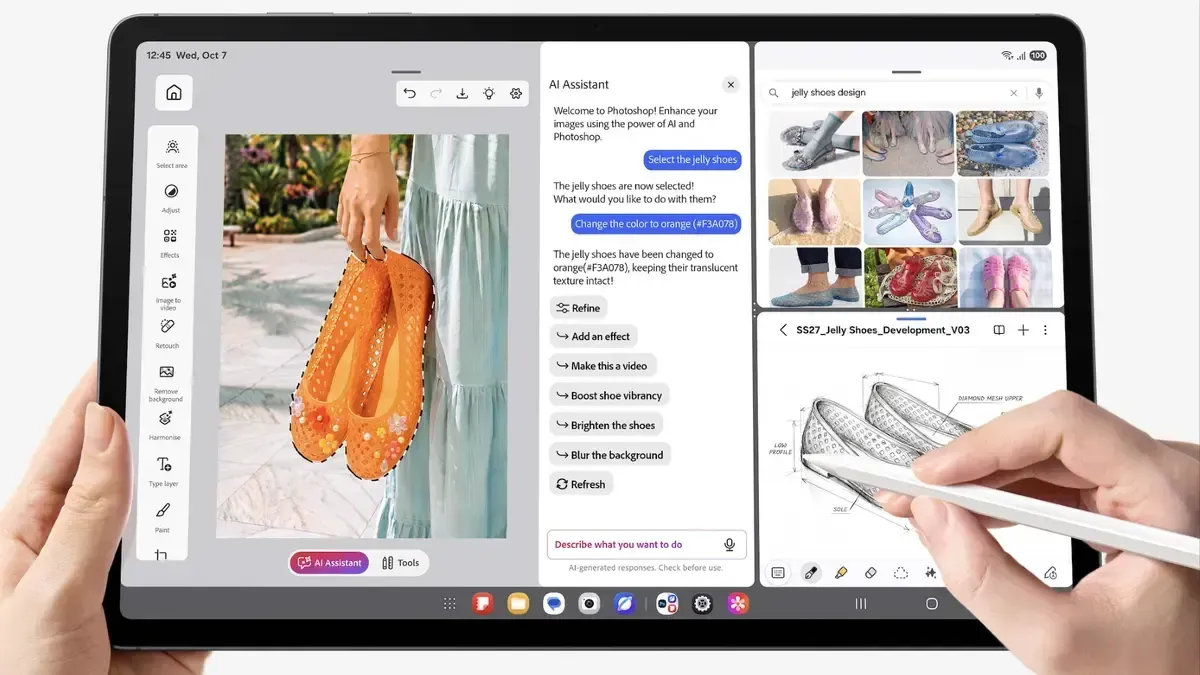
The only complaint I have is that the seamless touchpad—as accurate as it is—takes a much firmer click to select something than I’m accustomed to. Having said that, the device tablet itself ticks off many boxes that a modern-day professional might be looking for. I, for one, love the efficient and convenient split-window view, where I can look up information on Google Chrome on the right, and continue editing my article on the left side of the display.
I wasn’t using a Samsung smartphone at the time of reviewing this tablet, but if you have one, you can access Samsung DeX for seamless, inter-app usage across two Samsung devices. For anyone who spends hours on trains, flights, or the daily commute, that might just matter more than any spec-sheet flex.
Tech Specs
Under the hood, the Tab S12+ runs on the 3 nm MediaTek Dimensity 9,500 with 12 GB of RAM. Storage starts at 256 GB and goes up to 512 GB, and every model has a microSD slot that supports expansion of up to 2 TB. The microSD slot is becoming a rare but much-needed inclusion on premium tablets, and it is a real convenience for anyone with large media libraries or design files. Samsung promises up to seven OS upgrades and security updates, which is a long-term support rare in the Android world.
The IP68 rating for water and dust resistance is a quiet bonus. Between monsoon showers, dusty commutes, and outdoor use, it adds peace of mind that most slim tablets can’t offer.
The box contains the tablet, an S Pen, and a USB Type-C to Type-C cable. There is no charger, so budget for one if you don’t already own a compatible fast charger.
Performance & AI
The review unit I used had 256 GB of storage, 12 GB RAM and Android 17.
This efficiency shows up in multitasking, creative work and gaming. It comes pre-loaded with the free version of apps such as Photoshop, Notion, GoodNotes and Clip Studio Paint. The S-Pen really comes into good use across these content creation apps. With its ultra-low latency, it makes navigating, selecting and sketching feel natural - although my handwriting looks a lot uglier while using the stylus. With the S-Pen, the handwriting-to-text feature worked well, but leaves some room for accuracy still, with a fair bit of editing needed for typos in every sentence I wrote.
Samsung’s Galaxy AI is built into everyday use rather than tucked away in a menu. A dedicated Galaxy AI key on the Pro Keyboard gives me one-press access. You can also long-press the side button or use wake words: “Hi Bixby,” “Hey Google” or “Hey Perplexity.” Having a choice of assistants is a smart move. Brief is now slightly better integrated as an AI widget now. It creates colourful, customisable cards for weather, calendar and video (YouTube only), recommends playlists from YouTube, Spotify and Netflix, and helps me organise my schedule. It is a useful morning-glance feature for a busy working day.
Battery life
The 10,600 mAh battery is rated for up to 21 hours of video playback. In real-world usage, the battery on the tablet lasted me around two-four days, with the Wi-Fi constantly on and heavy usage of the S-Pen and media consumption of about two-Three hours a day. If you’re someone who plans to use this as a primary working device instead of a laptop, you will still be able to cruise through a workday without having to plug it in.
Verdict
To me, the Samsung Galaxy Tab S12+ represents an almost-perfect premium tablet. It balances form and functionality really well. It gives up the Ultra’s larger canvas in exchange for a lighter, more portable body while keeping the same flagship Dimensity 9,500 chip. Add the S Pen in the box, IP68 durability, microSD expansion, long battery life and seven years of software support, and it makes a strong case for anyone who wants a tablet that can genuinely handle work, study and play. Now while all of this might propel you towards choosing this, what might make the common consumer stop in their tracks - even if for a moment - is its steep price tag, especially if they’re not already part of the Samsung ecosystem.
Snapshots
Price: ₹ 1,94,999
Pros: Stunning display, spatial sound, decent battery life, ultra-thin and light despite a sizeable display
Cons: Keyboard comes at an additional cost and isn’t backlit
Published on November 18, 2026