
I thought the $129 third-generation Apple TV 4K was too expensive when I reviewed it four years ago, so the new model's $300 price seemed absurd at first, even with its upgrades. Then I tested it, and its speed, hands-free Siri, and ad-free interface changed my mind.
Still, if $300 is more than you want to spend, there are strong alternatives. The Roku Ultra ($149.99) also offers hands-free voice control and a streamlined, media-forward interface, though it lacks a full AI assistant and the Apple TV 4K's extensive smart home features. The Amazon Fire TV Cube ($199.99) has hands-free Alexa+ and is an even more powerful smart home hub, but its interface is clunky and full of ads, and it doesn't support AirPlay. And if you don't need hands-free voice control at all, streaming sticks like the Amazon Fire TV Stick 4K Plus ($69.99) and the Roku Streaming Stick Plus ($59.99) add streaming to any TV for well under $100.
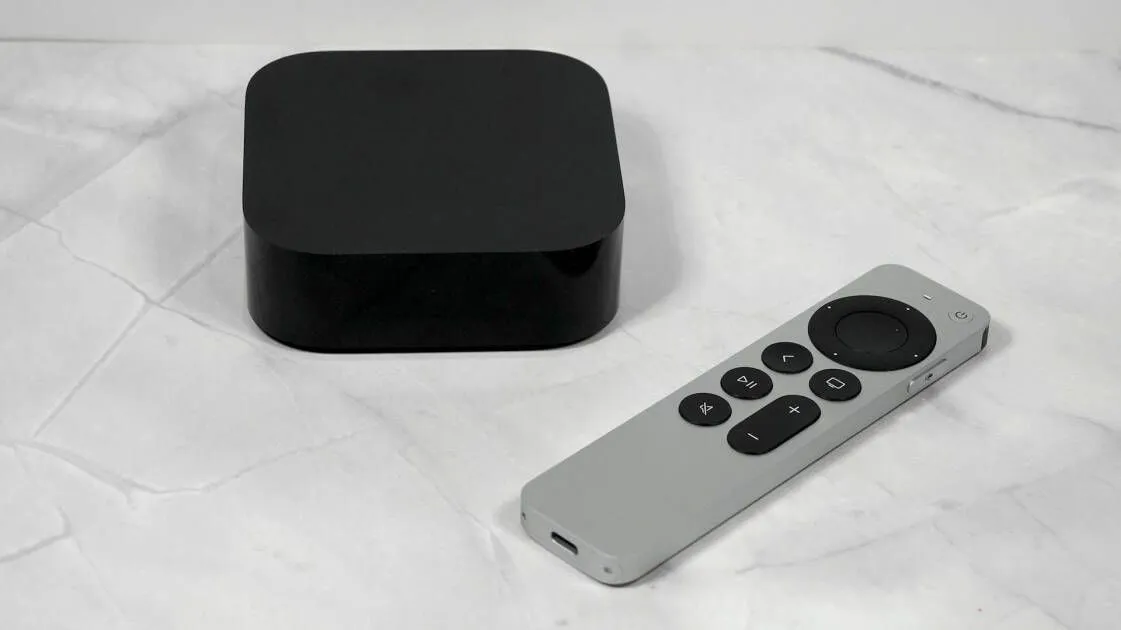
The new Apple TV 4K looks just like its predecessor: a black, rounded square box measuring 3.7 by 1.2 inches (width by height). The front has a status LED, and the back has HDMI, Ethernet, and power-cable ports.
The remote is thin and metal (Credit: Will Greenwald)
The remote is also unchanged on the outside. It's a slim aluminum bar that feels more like a narrow iPhone than a typical streaming remote. Near the top is a large navigation pad with a circular center button that doubles as a touchpad. Above the pad sit the power button and a pinhole microphone, and a Siri button runs along the right edge. The rest of the controls are minimal: a volume rocker, a mute button, a play/pause button, a back button (long-press it to return to the home screen), and an Apple TV button, which opens the Apple TV app with a press and a quick settings menu with a long press. A built-in rechargeable battery charges over USB-C on the bottom.
Similar Products
Our Current Picks for The Best Media Streaming Devices for 2026
Amazon Fire TV Stick 4K Plus
4.5
Outstanding
$24.99 at Amazon
$49.99 Save $25.00
$24 at Amazon Read Our Review
Onn Google TV 4K Pro Streaming Device
4.5
Outstanding
$44.73 at Walmart
$49.88 Save $5.15
$44 at Walmart Read Our Review
Amazon Fire TV Stick HD (2026)
4.5
Outstanding
$39.99 at Amazon
$39 at Amazon Read Our Review
Amazon Fire TV Cube (3rd Gen)
4.0
Excellent
$109.99 at Amazon
$199.99 Save $90.00
$109 at Amazon Read Our Review
Roku Streaming Stick Plus (2025)
4.0
Excellent
$47.09 at Amazon
$59.99 Save $12.90
$47 at Amazon Read Our Review
Apple TV 4K (3rd Generation)
3.5
Good
$249.99 at Best Buy
$249 at Best Buy Read Our Review
Roku Streaming Stick (2025)
4.0
Excellent
$24.00 at Amazon
$39.99 Save $15.99
$24 at Amazon Read Our Review
Roku Ultra (2024)
4.0
Excellent
$99.99 at Amazon
$149.99 Save $50.00
$99 at Amazon Read Our Review
The remote looks and feels great in the hand, but it can occasionally be frustrating to use. The touchpad is overly sensitive, and I’ve repeatedly brushed against it while pressing the directions around it, throwing off what I was trying to select. You can turn off the touchpad, but that raises the question of whether it was necessary to begin with. It can be useful when you want to swipe through multiple items at once, but I ended up turning it off anyway. I also kept mistaking the Apple TV button for the Home button until I found a setting that made it one. With those two tweaks, the remote became much easier to use.
Internally, the remote has a new trick: Precision Finding. If you have an iPhone 17 or later, an iPhone Air, or an iPhone Duo, you can use the Find My app to locate the remote to within about two feet. You can also use your phone to activate a chime on the remote to find it more easily.
The Apple TV 4K gets a major hardware boost from the A19 chip, the same processor that powers the iPhone 17, along with 8GB of memory. That's a big jump from the previous model's A15 Bionic (from the iPhone 13) and 4GB of memory. Media streamers don't need nearly as much processing power as phones or tablets, but extra headroom makes them more responsive when you jump between apps or play 4K HDR content. It also makes the Apple TV 4K a better gaming machine, since dozens of Apple Arcade titles run on tvOS.
There's a lot of power in this little black box (Credit: Will Greenwald)
Wireless connectivity also gets a bump on the new Apple TV 4K. It has Wi-Fi 7, enabling 6GHz band connections and future-proofing it considerably compared with the third-generation’s Wi-Fi 6. Gigabit Ethernet is built-in if you want a wired network link. It also features Bluetooth 6.0 compared with the previous model’s Bluetooth 5.0.
For all that new tech, the fourth-generation Apple TV 4K’s media capabilities are the same as its predecessor's. It plays 4K video, including high dynamic range (HDR) content in Dolby Vision, HDR10, and HDR10+, and supports Dolby Atmos spatial audio. That covers just about every format you'll encounter.
For the first few iterations of the Apple TV, I lamented its limited selection of apps and services, but the device has come a long way in recent years. Apple has polished its tvOS platform to a shine, making for an impressively elegant, smooth, and full-featured media streaming experience.
The interface is built around big, friendly tiles, with a simple home screen that holds six apps in a macOS dock-like bar at the bottom, and a larger contextual view that shows art or content suggestions based solely on the selected app. Scrolling down brings you to the full selection of apps on the device, and you can organize them into folders. It’s easy to understand, simple to navigate, and has no ads whatsoever. It’s everything I like about Roku’s devices, but even more polished.
Apple's tvOS is incredibly clean and doesn't have ads (Credit: Will Greenwald)
For streaming, tvOS covers all major services including Apple TV (obviously), Amazon Prime Video, Crunchyroll, Disney+, Netflix, Twitch, and YouTube. You can also mirror your iPhone, iPad, or Mac screen to it over AirPlay. For local media servers, Plex has an official tvOS app, while Emby and Jellyfin have a slew of third-party apps but no official ones; I had no problem connecting to my Jellyfin server with several of them.
I want to give particular credit to the Twitch app on tvOS as the most responsive version I’ve used on a media streamer. On multiple Fire TV and Google TV devices I've tested, the Twitch app lags several seconds when backing out of a channel to the main app screen. On the Apple TV 4K, it’s instant. It's a small thing, but as a Twitch watcher, I appreciate it.
If you like to game, you can pair a Bluetooth gamepad to the Apple TV 4K to play. The selection is overwhelmingly mobile-focused, with the same kinds of games you would find on iPad, but there are still some great console-like picks like Dead Cells, PowerWash Simulator, and SpongeBob SquarePants: Battle for Bikini Bottom.
Apple Arcade extends to tvOS, too, though I didn’t see many stand-out gamepad games on it besides the aforementioned PowerWash Simulator. A Steam Link client is also available, so you can stream games from your PC to your TV. Thanks to the A19 chip, games play very smoothly.
There are loads of apps and some good games on tvOS (Credit: Will Greenwald)
OK, the Apple TV 4K isn’t going to replace game consoles like the Nintendo Switch 2 ($499.99). You probably won’t get a ton of use out of pairing a gamepad with it unless you just use it to play games from your PC in another room. That said, it can still be great for party games considering nearly every Jackbox Party Pack is available on it (at $29.99 a pop, but still).
Siri is built into tvOS, and this is the first time you can use it hands-free with the Apple TV 4K. The new streamer has a far-field microphone array that lets you speak to Siri without picking up the remote. You can ask Siri to answer questions, search for media, control compatible smart home devices, and more. The version launching on the Apple TV 4K is the newer and more conversational Siri AI, which will be rolled out to the HomePod and HomePod mini later this year.
Siri AI is more conversational than ever and can answer questions in relative detail (Credit: Will Greenwald)
Siri worked well in testing, responding to my commands and answering my questions nearly instantly. It understood everything I said without issue, springing to life even with multi-step commands like “Turn on the TV and open Twitch.”
Making Siri hands-free puts it close to parity with the Fire TV Cube, Amazon’s top media streamer. I’ve long thought the Apple TV 4K was too expensive for a device without such a useful feature, so it's a welcome addition for this generation.
You don't need the remote to ask Siri for the weather (or anything else) (Credit: Will Greenwald)
(Credit: Will Greenwald)
Apple TV 4K (2026)
Editors' Choice
4.5
Outstanding
What Our Ratings Mean
5.0 - Exemplary: Near perfection, ground-breaking
4.5 - Outstanding: Best in class, acts as a benchmark for measuring competitors
4.0 - Excellent: A performance, feature, or value leader in its class, with few shortfalls
3.5 - Good: Does what the product should do, and does so better than many competitors
3.0 - Average: Does what the product should do, and sits in the middle of the pack
2.5 - Fair: We have some reservations, buy with caution
2.0 - Subpar: We do not recommend, buy with extreme caution
1.5 - Poor: Do not buy this product
1.0 - Dismal: Don't even think about buying this product
Read Our Editorial Mission Statement and Testing Methodologies.
There's no getting around the fourth-generation Apple TV 4K's $300 price, but there's also no getting around how good it is. It's the fastest, cleanest, and most polished media streamer I've tested, with an interface free of the ads and clutter that plague nearly every competitor. Hands-free Siri, Matter smart home support, and HomePod surround sound add real value on top of that. Still, $300 is a big ask, and you don't have to spend that much for a great streaming experience. The Roku Ultra ($149.99) costs half as much and also offers hands-free voice control, though it lacks a full AI assistant and robust smart home features. The Amazon Fire TV Cube ($199.99) is an even stronger smart home hub, but its interface is cluttered with ads, and it doesn't support AirPlay. Both have compromises, though, and the Apple TV 4K doesn't: It's the best premium media streamer you can buy and an easy Editors' Choice.
SHOULD I UPGRADE?
Yes, especially if you have an older model. Owners of the first- or second-generation Apple TV 4K will notice a dramatic speed boost, plus hands-free Siri, Wi-Fi 7, and Matter support. If you have the third-generation model, the case is less clear-cut: video and audio capabilities are identical, so you're paying for hands-free Siri, faster performance, HomePod surround sound, and Precision Finding for the remote.
GET IT NOW