

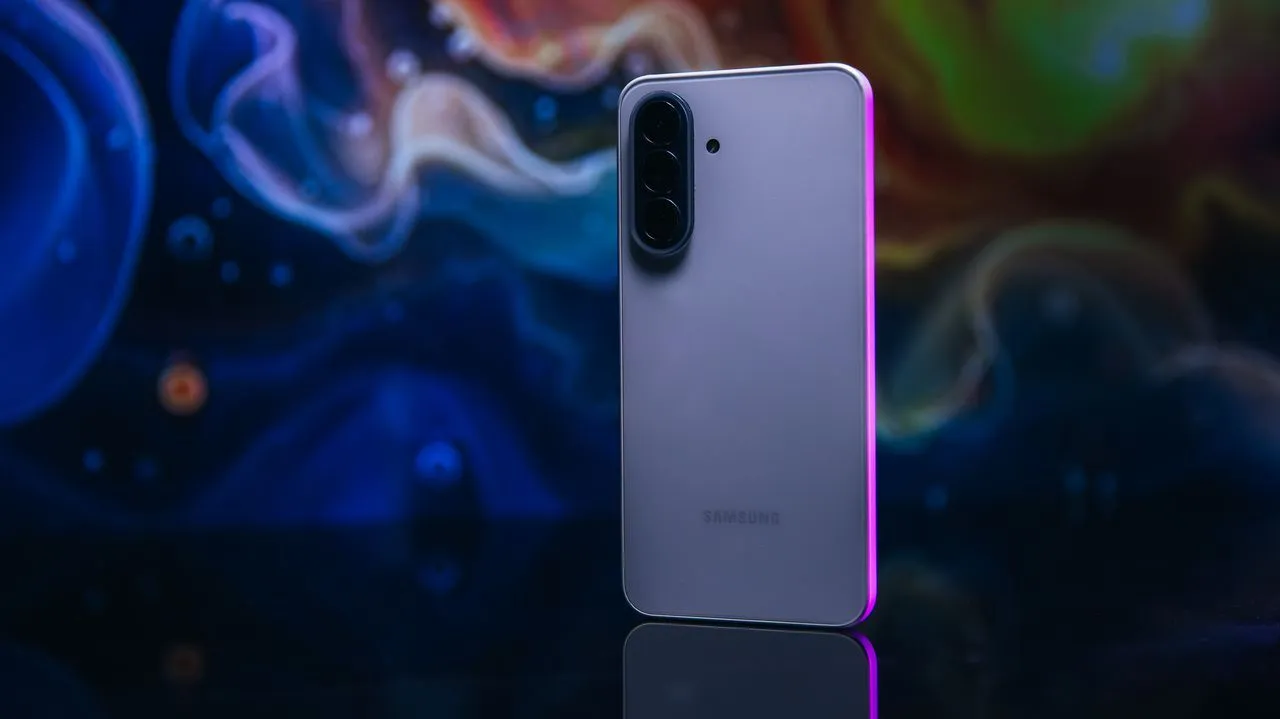
Samsung’s $490 Galaxy A37 5G could be one of the most underrated cheaper phones right now, but throughout my weeks of testing the phone, I had a constant feeling of FOMO.
On one hand, the Galaxy A37 checks all the boxes for what you might need in a phone, especially if what you are looking for is a nice device from Samsung that costs under $500. The phone’s battery recharges really fast, so you don’t need to charge this phone overnight to fill it up — a nice perk to see in a lower-cost phone. Since Samsung provides six years of software and security updates to its Galaxy A phones, the A37 will continue to get access to new Android features — some competing value-priced phones like Motorola’s Moto G line still only get half as much support.
With phone prices constantly rising due to the ongoing RAM shortage, the Galaxy A37’s biggest strength may be that it has remained under $500 since its release back in spring. Many other companies have had to cross that boundary with their value-focused phones, including Google’s now-$599 Pixel 10A and Motorola’s $599 Edge. The A37 itself launched at $450 for its 128GB model and has had a comparably reasonable $40 price increase in the months since it hit store shelves. For more storage, the phone’s 256GB model costs $610.
More from CNET
The thing with the Galaxy A37 is that its price is the main reason to buy the phone, not its features. The A37 noticeably misses out in areas where comparably priced phones aren’t skimping. For instance, after getting updated to Samsung’s One UI 9.0, the A37 didn’t get AirDrop support through Quick Share, a feature which makes it way easier to share photos and videos with iPhone-owning friends and family. Meanwhile, Google’s Pixel 10A has it, and you can get it on a used Galaxy S25 that’s fairly easy to find for under $500. You also don’t get wireless charging or Emergency SOS satellite communication, both of which are also on the Pixel 10A.
It doesn’t mean that the Galaxy A37 is a bad phone. Heck, if you find it discounted to $400, which it often is, the phone could still be a great value if what you’re looking for is an essentials-only Galaxy handset. Even better if your carrier is offering it as a free option when signing up for a carrier contract. But at its full retail price, I think you should shop around for either a Pixel 10A or a discounted Galaxy S25, as the compromises are quite apparent.
Samsung Galaxy A37: Design, software and features
To be blunt, I wish that Samsung would improve the way its Galaxy A line looks. My A37 review unit comes in white plastic with a hyper-glossy finish, so fingerprints and small scratches show up fairly easily. The phone’s also available in gray-green, charcoal and lavender options — of which the latter would be my favorite among the group. However, compared to the aluminum on Google’s Pixel 10A or the textured vegan leather on Motorola’s Moto G line, the A37’s look seems utilitarian.
The camera island does give it some resemblance to the Galaxy S26 line, and around the front, the display is surrounded by a thin bezel along with a minimal display cutout for the front-facing camera. Underneath the display is an optical fingerprint sensor, and I like that Samsung includes the option for an always-on display that shows not only the time but also where to press to unlock the phone.
While I do notice several omissions that are reserved for the Galaxy S line, I generally find Samsung’s One UI to be among the more feature-filled Android software customizations for lower-cost phones. You get many Samsung-designed apps like its Weather app, Samsung Health if you want to pair it with a Galaxy Watch and the option to cast your phone’s screen over both Miracast (to devices like a Roku box) or Google Cast (to Google TV).
I’m happy to see that One UI 9, which is based on Android 17, also added the improved Samsung Smart Switch app that syncs directly with Apple’s iOS 27 when moving over from an iPhone. This should make the Galaxy A37 easier for someone that’s making the move from an older iPhone because the improved app transfers your iPhone’s data directly into the equivalent Samsung and Google apps.
But as Samsung keeps leaning into promoting its Galaxy AI features on more expensive phones, such as the AI-powered My FanCam for making subject-focused videos, it’s important to make clear that AI on the Galaxy A37 is a more limited experience. You’ll primarily see Galaxy AI features for editing photos and access to cloud-powered Gemini features, like Circle to Search. That said, the lack of AI might indeed be a perk for the A37 since its more utilitarian focus keeps it easy to use for essentials, like phone calls, texting and watching videos.
The Galaxy A37’s 5,000-mAh battery will easily get through a day of use. I was particularly impressed by how its 45-watt charging speed helped the phone recharge from 0% to 70% in 30 minutes. I wish it had wireless charging, since similarly priced phones like Motorola’s $500 Moto G Stylus have it, but its wired charging is quite a bit faster than what we see in several more expensive phones.
The phone’s Exynos 1450 processor isn’t that powerful, but it’s enough for my regular multitasking routines of texting or playing games while listening to music. Its scores in benchmark tools like Geekbench 7.0 and 3DMark Wild Life Extreme are comparable with other value-focused phones, like the Moto G Stylus, but are quite a bit lower than Google’s Pixel 10A with its Tensor G4 chip.
Galaxy A37 cameras
If you keep things simple with the Galaxy A37’s 50-megapixel wide camera, 8-megapixel ultrawide camera and 5-megapixel macro camera, the phone can take some quality photos in different lighting situations.
I was quite happy with my photos taken on the wide camera at Shem Creek in Mount Pleasant, South Carolina. The A37’s camera captures the orange-red shades of sunset along with the shadows on this footbridge. The phone’s camera isn’t clearly capturing much beyond that — for instance, you aren’t getting much detail of the footbridge itself, but for most people, this is still a nice photo for sharing with others.
And ditto for the 8-megapixel ultrawide camera. This photo taken from a rooftop bar in Gulfport, Florida, takes advantage of all that sunlight to show the glisten of the ocean, but it’s certainly not capturing details of the palm trees nor much of the condiments on the table directly in front of me.
The best photos for the Galaxy A37 will come in good lighting with static subjects. This photo of my breakfast sandwich taken back in New York provides a nice glisten on the bun and is able to see some of the melted cheese.
It’s important to set expectations a bit lower for dim environments. This closeup of a strawberry cheesecake was taken inside a dark cafe at night, and while the phone gets a tight shot of the texture of the dessert, it’s also clear that everything around this delicious morsel is out of focus. I took three attempts to photograph this dessert, and the other tries made the cake either too dark or too blurry.
When leaving the US Open last summer, I took this nighttime photo of the walkway that faces Citi Field — I feel like the camera had an especially challenging time juggling the focus between the various light sources, leading to a more washed-out look.
Selfies on the 12-megapixel front-facing camera are fine, but I’m not crazy about them. This photo taken along the waterfront on New York’s Upper West Side on an overcast day does capture a lot of detail on my face and hair, but I’m surprised by how dark the photo turned out. And the water behind me is noticeably out of focus.
But again, when there’s less information to capture, results are a bit better. This photo taken while visiting the US Open has more even lighting and captures some of the plants behind me — given they are also a bit bokeh’d out.
The Galaxy A37’s able to capture video at 4K resolution at 30 frames per second, as well as 1080p resolution at 60 frames per second.
Overall I do think the camera is good for most situations, but it isn’t great if you are hoping to shoot light-intensive events like concerts. The camera is definitely an area where I think Google’s Pixel 10A earns its premium over the Galaxy A37, as that phone’s camera does especially well capturing background details and for lowlight photography. But for most simple point-and-shoot moments, the A37 will be enough.
Galaxy A37: Bottom line
During my time testing the Galaxy A37, I felt like this is the right phone for someone looking for the essentials at a low price. While I find Samsung’s even-cheaper Galaxy A17 (which had its own price increase from $200 to $270 over the past year) to be functional but slow, the A37 has just enough power and camera performance that I wouldn’t feel annoyed when using it. But I think it’s important to look for a retailer selling it for $400 or less to get the right value from it, and with holiday sales, you very well could.
But at $480, I feel like most people would be better off considering other options. Motorola’s $500 Moto G Stylus, for instance, provides an enhanced stylus, even faster 68-watt wired charging and a slightly bigger 5,200-mAh battery. Or if you are able to step up your budget to the $599 Pixel 10A, you’ll get a more stylish phone with a markedly better camera.
How we test phones
Every phone tested by CNET’s reviews team was actually used in the real world. We test a phone’s features, play games and take photos. We examine the display to see if it’s bright, sharp and vibrant. We analyze the design and build to see how it is to hold and whether it has an IP-rating for water resistance. We push the processor’s performance to its limits using standardized benchmark tools such as Geekbench and 3DMark, along with our own anecdotal observations navigating the interface, recording high-resolution videos and playing graphically intense games at high refresh rates.
All the cameras are tested in a variety of settings, from bright sunlight to dark indoor scenes. We try out special features, such as night mode and portrait mode, and compare our findings against similarly priced competing phones. We also check out the battery life by using it daily as well as running a series of battery drain tests.
We take into account additional features, including support for 5G, satellite connectivity, fingerprint and face sensors, stylus support, fast charging speeds and foldable displays, among other features that can be useful. We balance all this against the price to give you the verdict on whether that phone, whatever its price, actually represents good value. While these tests may not always be reflected in CNET’s initial review, we conduct follow-up and long-term testing in most circumstances.